
WowOptin: How I Built a Canva-Like WordPress Popup Builder
Samin Yaser
8 minute read · Friday, July 10, 2026How I built WowOptin, a Canva-like WordPress popup builder with smart targeting, 19 integrations, A/B testing, and a production campaign engine.
Project overview
I built WowOptin at WPXPO around one product idea: creating a WordPress campaign should feel as flexible as designing in Canva. Most popup tools guide users through fixed sections, rows, and columns. WowOptin gives marketers a custom drag-and-drop canvas where they can position, resize, group, layer, and style elements directly.
The visual builder became the foundation for a much larger campaign system. WowOptin now combines 700+ ready-made templates, 11 design elements, six smart triggers, advanced audience and page targeting, 19 documented integrations, multi-step forms, analytics, and manual or automatic A/B testing. It supports popups, banners, floating bars, slide-ins, and inline forms from one editor.
The product is available on WordPress.org and is actively used on WPXPO’s own website. On July, 2026, WowOptin has 1.5K active installations and 22 five-star ratings.
Major features at a glance
- Custom Canva-like builder: free-form drag, resize, grouping, layers, responsive controls, undo/redo, keyboard shortcuts, and multi-step campaign design.
- 11 campaign elements: text, image, video, form, button, shape, coupon, countdown, social, shortcode, and custom HTML.
- Six smart triggers: time delay, scroll depth, inactivity, exit intent, click, and hover.
- Smart targeting: six audience dimensions, 12 documented WordPress rule families, ecommerce-specific conditions, scheduling, cookie targeting, and display intervals.
- 19 documented integrations: email marketing, CRM, analytics, webhook, and AI services, plus support for Contact Form 7, Formidable Forms, and WPForms.
- A/B testing and analytics: weighted traffic, consistent visitor assignment, manual or automatic winner selection, and results based on conversions, conversion rate, leads, or revenue.
- 700+ templates: starting points for subscriber campaigns, announcements, coupons, special offers, and ecommerce promotions.
- Optimized campaign delivery: server-side eligibility checks and focused frontend loading so the browser receives the campaigns relevant to the current visit.
The feature that made WowOptin different
The custom visual builder was the most important engineering decision in the project. I did not want to build another form editor where every design had to fit a predefined layout. The goal was direct manipulation: select an object, move it, resize it, change its layer, group it with other elements, or tune it for a specific device.
The editor is a React application built with WordPress’s @wordpress/data state system. Under the canvas, each campaign is a nested block document. The editor keeps track of block relationships, selection, responsive values, hidden elements, design controls, and multi-step state while the user works.
That model makes the builder feel simple even though the operations are not. Dragging a grouped element updates the complete block tree. Switching to a mobile preview preserves desktop design choices while allowing device-specific adjustments. A bounded undo/redo history keeps recent canvas and design-menu changes reversible without letting a long editing session consume unlimited memory.
This free-form workflow is the product’s clearest differentiator. It lets a marketer start from a blank canvas or one of the template designs and still retain control over the final result.
Smart triggers with compound logic
A polished design is useful only if it appears at the right moment. WowOptin includes six behavior-driven triggers:
- after a configurable number of seconds;
- after the visitor scrolls to a pixel or percentage threshold;
- after a period of inactivity;
- when exit intent is detected;
- after a click on a matching element;
- after hovering over an element for a configured duration.
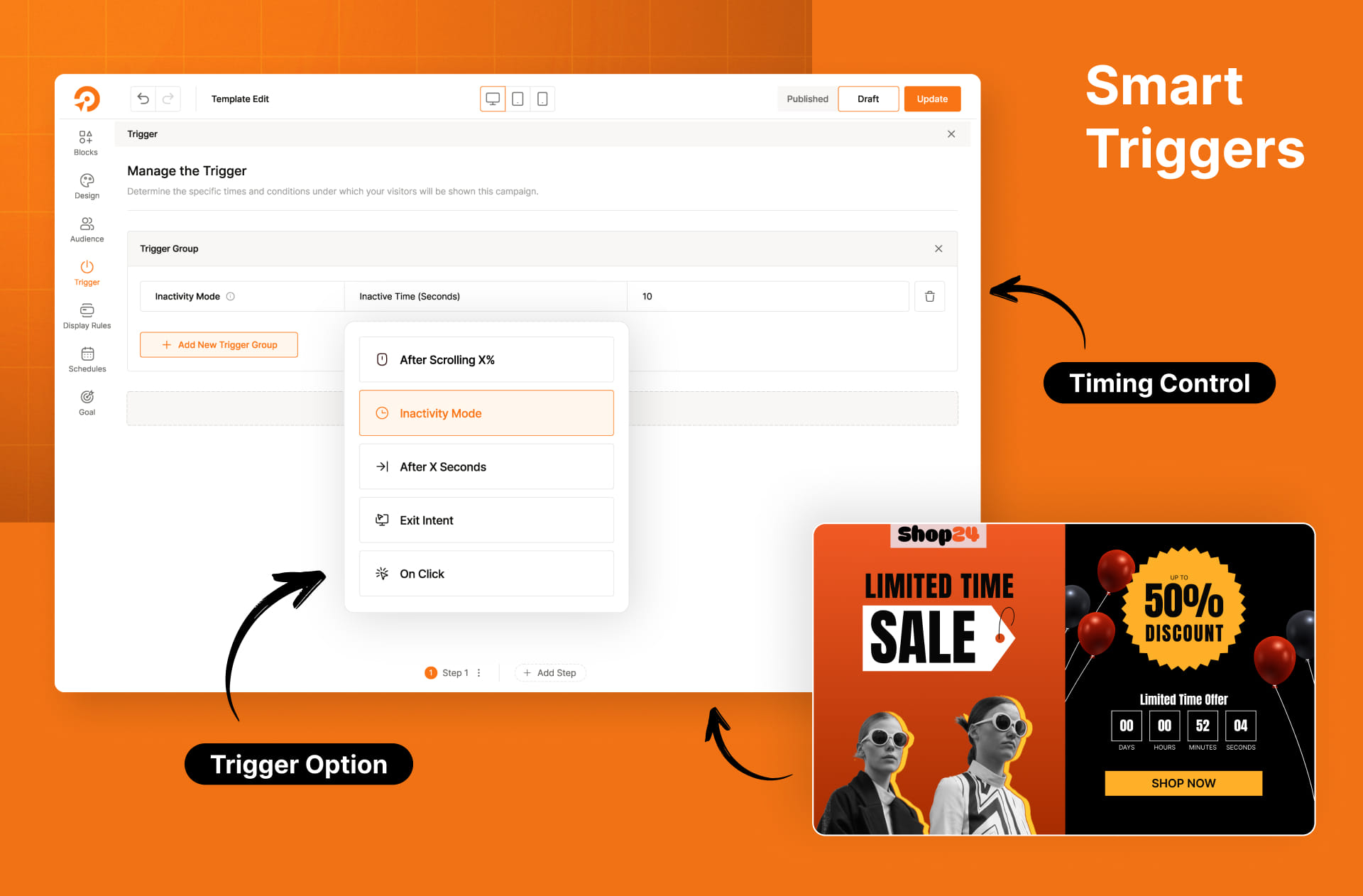
I designed trigger groups so marketers can express more than a single event. Triggers inside one group use AND logic, while separate groups use OR logic. A campaign can therefore open when a visitor has scrolled 70% and remained inactive for ten seconds, or when another valid group completes first.
The browser runtime mirrors that model with composable asynchronous conditions. Once a group succeeds, it cancels unused timers and event listeners. Click and hover triggers can also follow content added after page load, which matters on WordPress sites that use page builders, filters, and dynamic ecommerce widgets.
The result is a smart trigger engine that remains predictable for marketers and efficient in the browser.
Audience targeting and display rules
Triggers decide when a campaign opens. Targeting decides who can see it and where it is eligible to appear.
WowOptin’s audience controls cover six documented dimensions:
- visitor device;
- new, returning, logged-in, guest, or customer status;
- browser language;
- country and EU-region geolocation;
- operating system;
- traffic source.
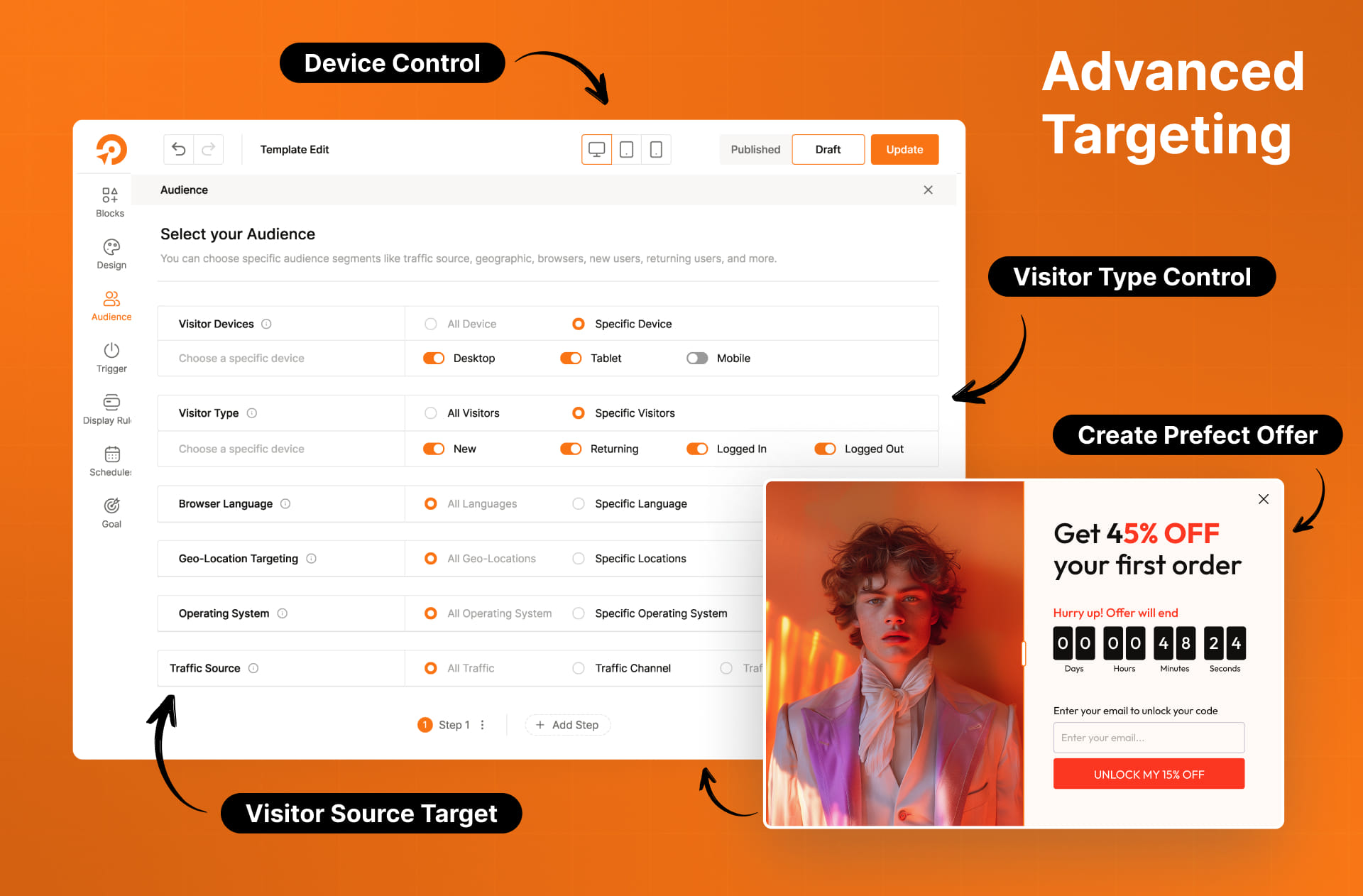
Page-level targeting adds 12 documented WordPress rule families: entire site, home page, page, parent page, author, post type, cookie, URL path, custom URL parameter, individual posts, post category, and post tag. WooCommerce and Easy Digital Downloads conditions extend those rules for product and store pages.
Campaign owners can combine rules with AND/OR groups, schedule start and end dates, select days and time windows, and control how often a visitor sees the same campaign. I kept the rule builder visual so the power does not turn into a configuration file disguised as a settings screen.
On the public site, the optimized campaign runtime evaluates eligibility before rendering. That keeps unrelated campaigns out of the visitor’s path and gives the frontend only the data and behavior it needs for the current request.
One builder, 19 integrations
Lead capture is only useful when the data can reach the tools a business already uses. WowOptin documents 19 integrations:
Webhook, ActiveCampaign, SendFox, Mailchimp, Moosend, Omnisend, MailerLite, MailPoet, HubSpot, Kit, Campaign Monitor, Brevo, FluentCRM, GetResponse, Drip, Google Analytics, ChatGPT, Gemini, and Grok.
The plugin also supports embedding or connecting forms from Contact Form 7, Formidable Forms, and WPForms.
The technical challenge was not displaying a list of logos. Every provider has different authentication, list discovery, field mapping, duplicate-subscriber behavior, and error responses. I built a shared integration layer so the form element can submit a consistent campaign payload while each provider adapter handles its own API details.
That separation also made the integration library easier to grow. A new provider can reuse the same account, caching, form-mapping, and submission flow instead of adding provider-specific logic to the visual builder.
The AI connections use the same extensible approach. A marketer can connect ChatGPT, Gemini, or Grok and generate or refine campaign copy without leaving the builder.
A/B testing that keeps visitor behavior consistent
WowOptin supports both manual and automatic A/B tests. Campaign owners select variants, choose the traffic distribution, set a duration, and decide whether the winner should be measured by conversions, conversion rate, collected leads, or revenue.
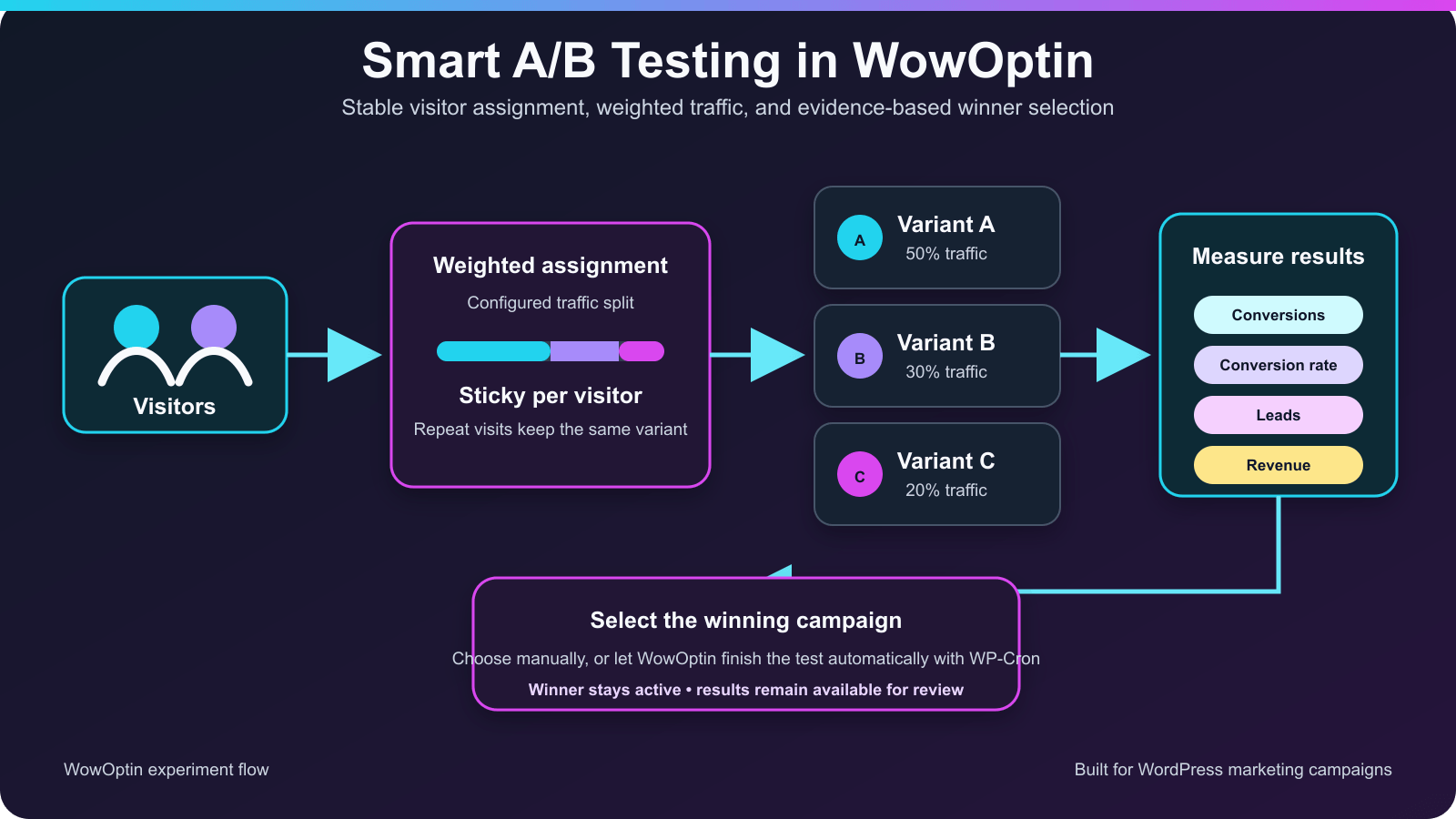
The algorithm solves an important measurement problem: a returning visitor should not receive a different variant on every page view. WowOptin creates a stable visitor assignment, remembers the viewed variant, and uses the configured traffic weights for new participants. This keeps the experience consistent and protects the experiment from avoidable assignment noise.
For automatic tests, WordPress schedules the final evaluation. The winning variant remains active, the other variants are closed where appropriate, and the result stays available for review. Manual selection remains available when a campaign owner has business context that an automated metric cannot see.
This was one of the most satisfying parts of the project because it joined product design and algorithmic thinking. The interface stays approachable, while the runtime handles weighted allocation, repeat-visitor consistency, metric calculation, and test completion.
Running real campaigns on WPXPO
WowOptin is not only presented as a product on the WPXPO site; WPXPO uses it to run campaigns.
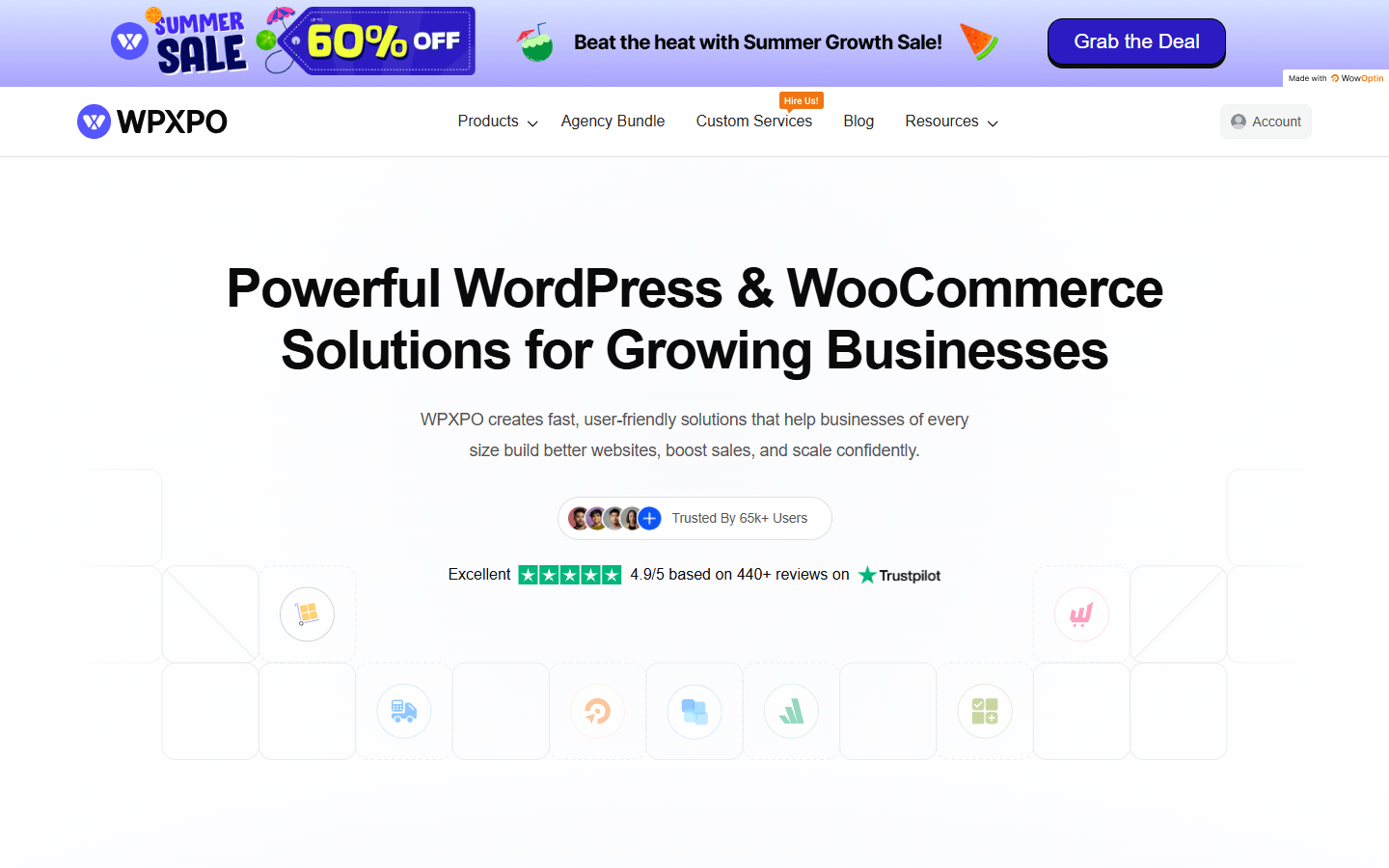
During review, the WPXPO homepage rendered a full-width Summer Sale banner with a 60% offer and a visible “Made with WowOptin” badge. The campaign used an immediate trigger and page-specific display rules. The site also exposed four click-triggered lead-generation campaigns for WowAddons, WowShipping, PostX, and WowStore, each with an email collection and download flow.
That production use demonstrates the complete path: design a campaign in the custom builder, target it to the right page, apply trigger logic, render it on a live site, and connect the interaction to a marketing goal.
Achievements
The project grew from a free-form editor into a complete WordPress campaign platform:
- 1,000+ active installations reported by WordPress.org;
- an estimated 1.5K active installs and 10% 30-day growth reported by WP-Rankings on July 10, 2026;
- a five-star WordPress.org rating from 22 reviews;
- compatibility tested through WordPress 7.0.1;
- 700+ first-party campaign templates;
- 19 documented integrations and three supported external form plugins;
- a production campaign engine used on WPXPO’s own website;
- visual design, targeting, triggers, analytics, integrations, and experimentation delivered in one plugin.
The strongest achievement is still the builder. It gave WowOptin a product identity that users can understand immediately: Canva-like flexibility inside WordPress, backed by the campaign controls needed to turn a design into a targeted marketing experience.
Challenges that shaped the product
The hardest challenge was maintaining consistency across the editor and the public campaign. A free-form canvas creates far more design states than a fixed layout builder. Solving that pushed me toward a structured block model, centralized state, responsive overrides, reusable rendering components, and version-aware output. The result was a builder that could keep evolving without giving up compatibility with saved campaigns.
Trigger composition created a different problem: multiple timers, scroll handlers, mouse events, and dynamic elements can easily leave stale listeners behind. Modeling triggers as grouped conditions and cancelling the losing paths produced a cleaner runtime and enabled more expressive marketing rules.
Integrations taught me to isolate provider differences behind a common contract. A/B testing taught me to think beyond random allocation and account for repeat visitors, traffic weights, winner metrics, and campaign lifecycle. Each challenge added a reusable system rather than a one-off patch.
There is still room to strengthen automated coverage across WordPress, PHP, browsers, responsive editing, and campaign delivery. That is the next stage of the engineering work. The important lesson from WowOptin is that product flexibility needs an equally disciplined internal model. Building both is what allowed the plugin to grow from a custom editor into a campaign platform used on real websites.
Conclusion
WowOptin started with a clear differentiator: give WordPress marketers the freedom of a Canva-like drag-and-drop builder. I then built the systems around that canvas so a design could become a smart, measurable campaign.
Today the plugin combines free-form design, six trigger types, detailed audience and page targeting, 19 integrations, analytics, and A/B testing. It is used on more than 1,000 WordPress installations and runs live campaigns on WPXPO. For me, the project is proof that an ambitious interface can become a dependable product when the editor, targeting engine, integrations, and runtime are designed as one system.