
WowInvoice: WooCommerce PDF Invoices and Packing Slips, Automated
Samin Yaser
8 minute read · Saturday, July 11, 2026How I built WowInvoice to automate WooCommerce PDF invoices, packing slips, fulfillment documents, bulk exports, tax data, and UBL output.
Project overview
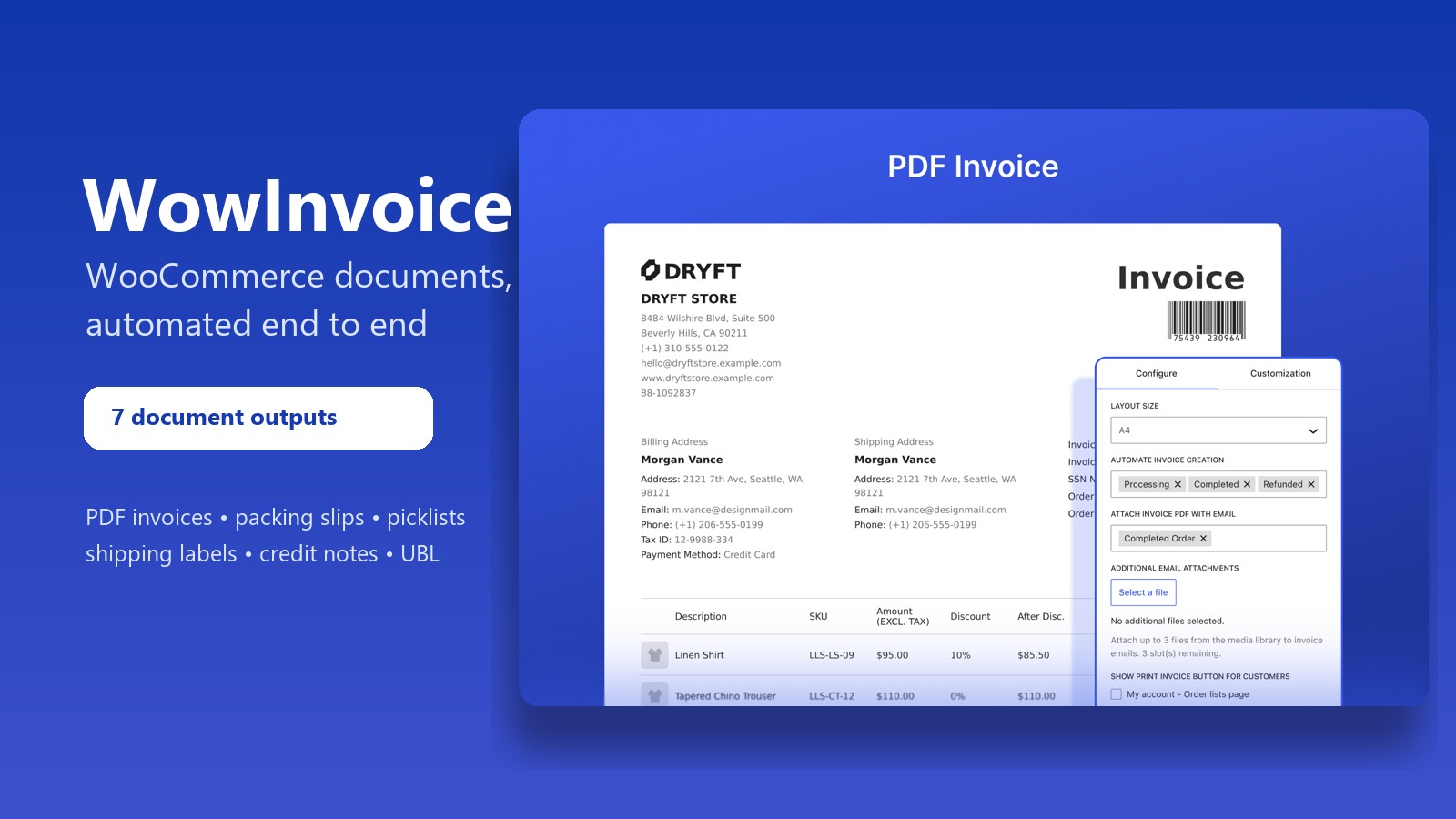
I built WowInvoice at WPXPO to automate the document work that begins after a WooCommerce customer places an order. Instead of assembling separate tools for invoices, warehouse paperwork, shipping, and electronic billing, a store can configure the workflow once and generate seven document outputs from the same order data.
WowInvoice produces six visual document types: PDF invoices, packing slips, picklists, delivery notes, shipping labels, and credit notes. It also produces machine-readable UBL invoices. Stores can generate these documents for new or existing orders, attach them to WooCommerce emails, give customers download access, and combine them for bulk processing. The same workflow handles VAT, tax, barcodes, QR codes, and right-to-left languages.
Behind the interface, the product includes a React administration app, a PHP document model, an mPDF rendering pipeline, background export jobs, WooCommerce order and email integrations, and structured UBL XML generation.
Seven document outputs, one order workflow
I did not want seven document types to become seven separate implementations. I built a central registry that records what each output can do: which class implements it, which file type it produces, whether it can be printed or downloaded, whether it supports a custom identifier, and whether it can trigger a warehouse notification.
That registry currently drives:
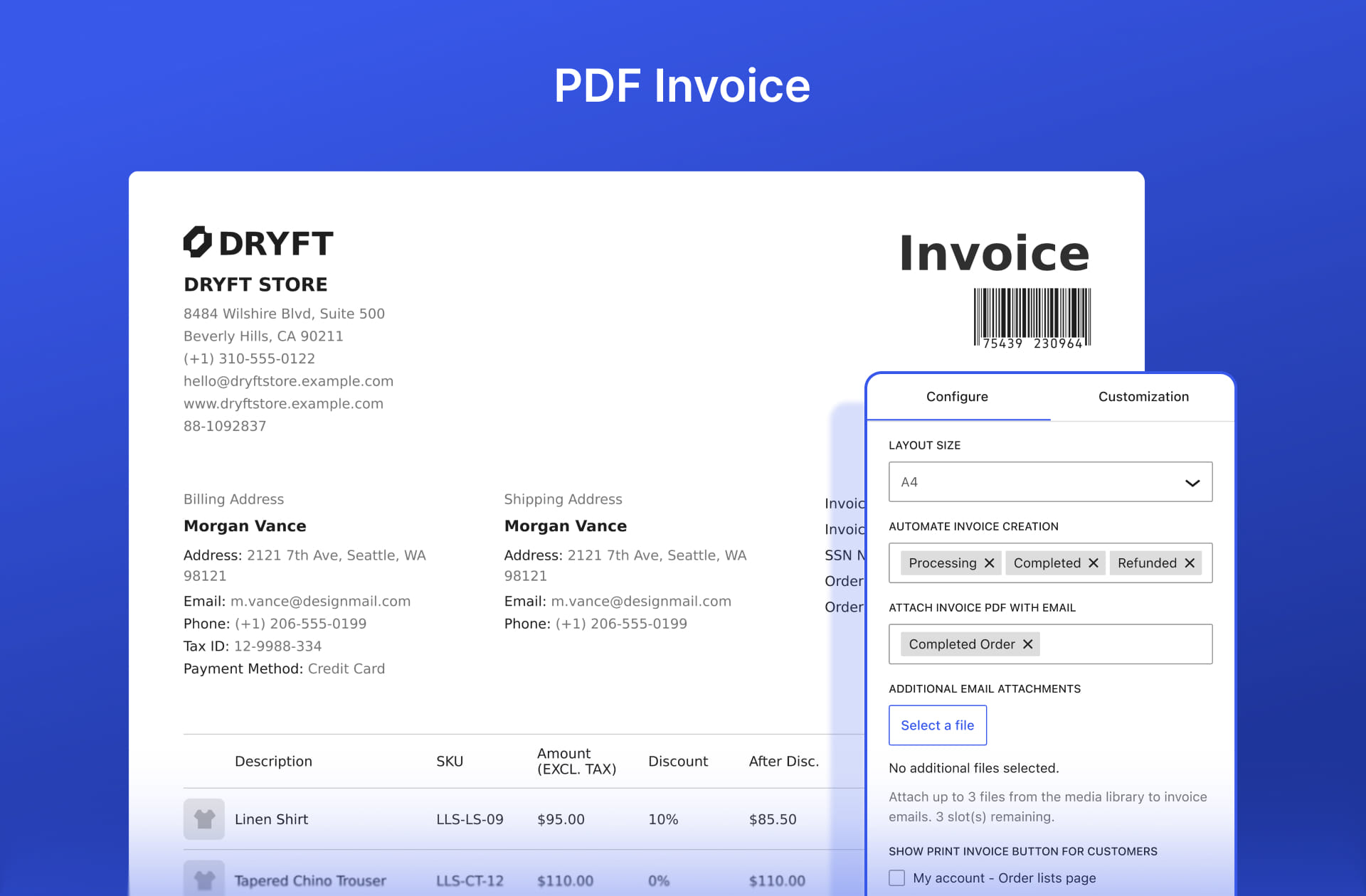
- PDF invoices with configurable numbering, taxes, totals, customer access, and email delivery;
- packing slips for checking the contents of each shipment;
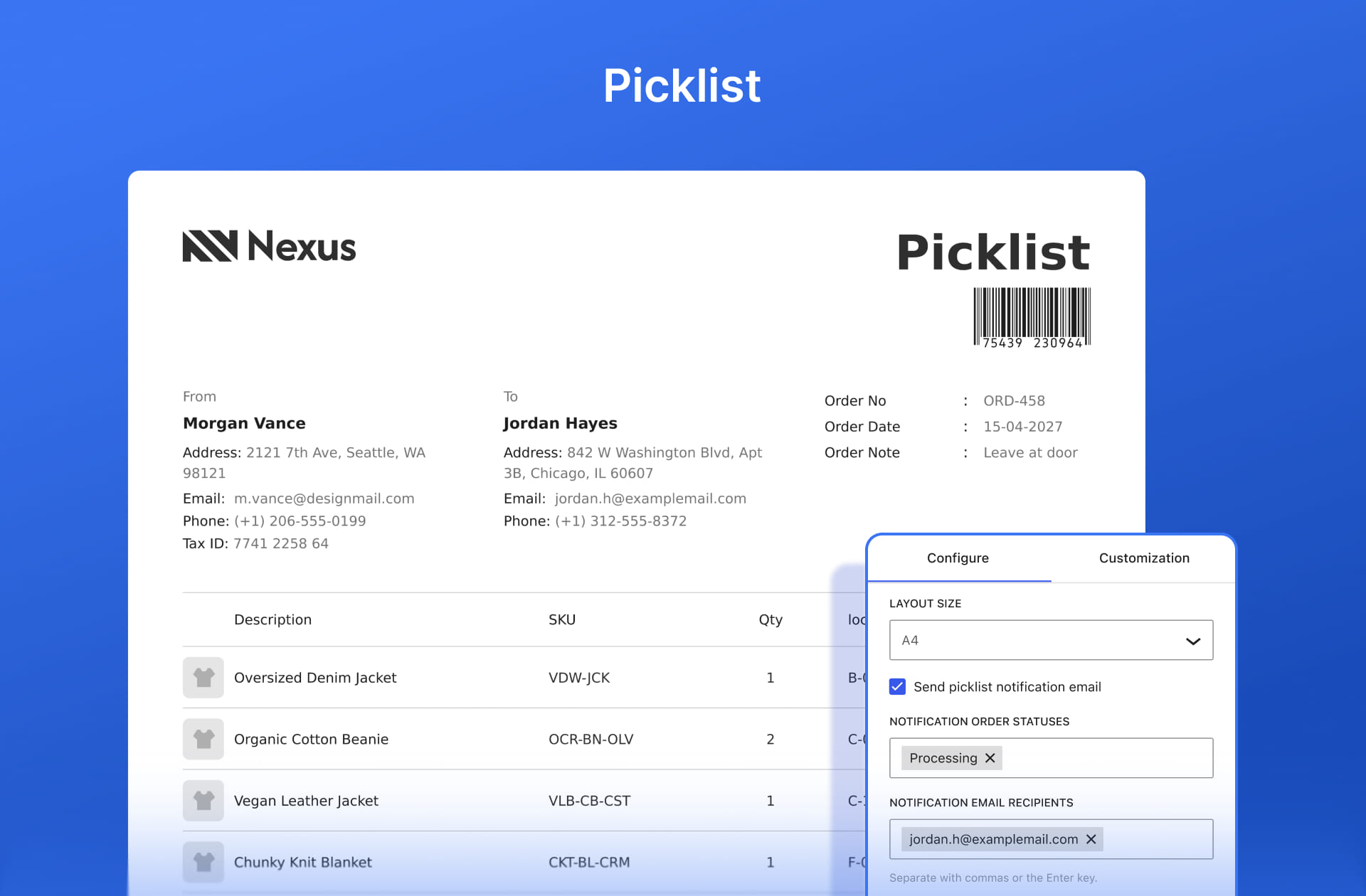
- picklists that consolidate the products warehouse staff need to collect;
- delivery notes for confirming fulfilled deliveries;
- shipping labels with configurable page dimensions and handling marks;
- credit notes created from WooCommerce refund data;
- UBL invoices for machine-readable accounting and e-invoicing workflows.
The shared model keeps behavior consistent across the administration app, order screens, email attachments, customer downloads, previews, printing, and bulk export. Adding a capability to the registry makes it available to the services that understand that capability instead of requiring another chain of document-specific conditionals.
A configurable PDF rendering pipeline
The builder separates document configuration from PDF rendering. The React interface stores layout, visibility, labels, colors, typography, numbering, automation, and notification choices. On the server, a preparation layer resolves the selected order into a normalized document context: identity, store profile, customer addresses, products, totals, tax data, notes, and output flags.
Document templates use that prepared context to produce HTML. A dedicated PDF maker passes the HTML to mPDF. The templates stay focused on document markup, while the rendering service owns page size, margins, fonts, metadata, directionality, and language behavior.
I packaged mPDF as a prefixed dependency so its classes do not collide with another WordPress plugin shipping a different version of the same library. The build process runs PHP-Scoper, creates an authoritative prefixed autoloader, and removes unused bundled font assets. The runtime can download and register the fonts it needs, while the PDF configuration enables script-to-language and language-to-font detection for multilingual documents.
The same rendering layer also handles combined PDFs. It imports generated pages, calculates their dimensions, and can place several documents on a page for bulk printing. Bulk export therefore runs as one managed operation rather than a loop of individual downloads.
Preserving what an issued document meant
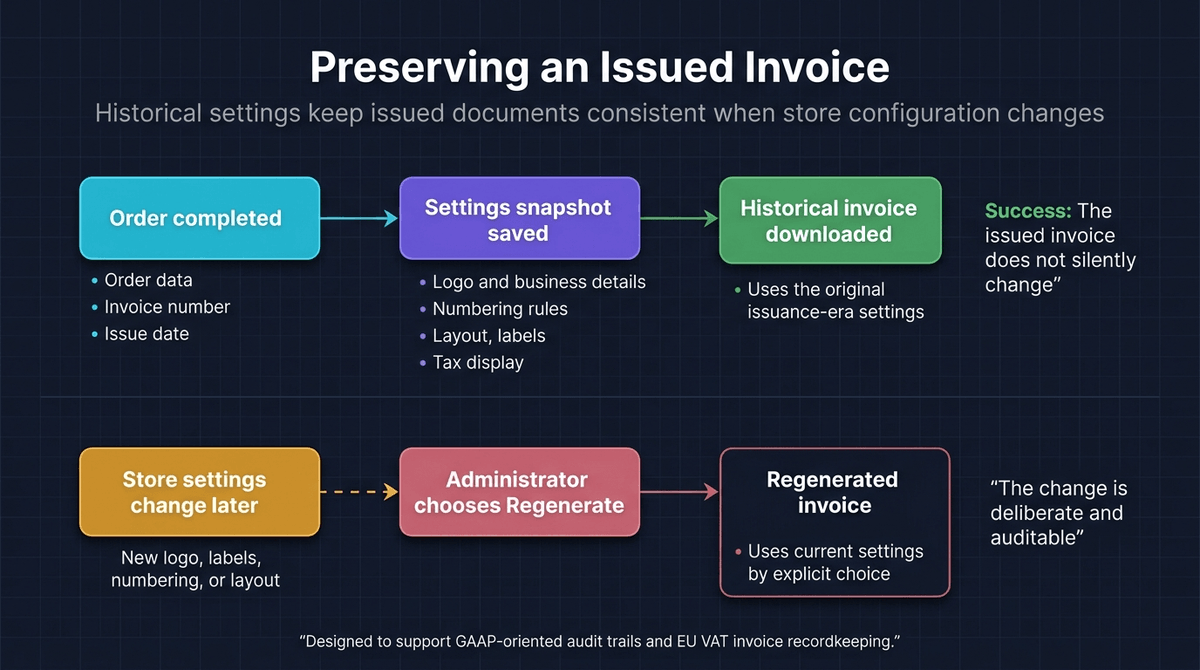
Invoices create a subtle correctness problem: store settings continue to change after an order is completed. If every download used the newest logo, labels, numbering rules, and document configuration, an old invoice could silently change months later.
I designed the document service to snapshot the relevant settings against the order. When the plugin renders an issued historical document, it resolves that snapshot while allowing a small set of intentionally live settings to remain current. Preview mode follows a separate path and merges unsaved builder changes over the latest configuration.
This gives the product two explicit behaviors. A normal download preserves historical document meaning; an administrator can deliberately regenerate a document when the current settings should replace that snapshot. The order screen communicates that distinction before regeneration instead of treating it as an invisible side effect.
Custom invoice and credit-note identifiers follow the same lifecycle. WowInvoice supports an order-based number or a dedicated sequence with prefixes, suffixes, and minimum lengths, then stores the issued identity with the order. Searchable and sortable invoice metadata also works with both WooCommerce’s legacy order table and High-Performance Order Storage.
Automating email and fulfillment handoffs
Document automation begins with WooCommerce events. WowInvoice can initialize documents from configured order states, create a credit note after a refund, and attach eligible files to WooCommerce emails. Customers can receive a download action in an email or access available documents from their account page.
The fulfillment documents add a second path for store staff. Packing slips, picklists, delivery notes, and shipping labels can register dedicated WooCommerce notification emails. Their shared dispatcher validates recipients, reacts to new orders or status changes, generates the selected document, and sends it as an attachment through WooCommerce’s email system.
I kept this logic in one notification layer. It sanitizes recipients, matches order statuses, generates attachments, resolves placeholders, and renders the email. Each document definition only supplies its identity and labels, so I did not have to maintain six slightly different email implementations.
Background bulk exports instead of long requests
Exporting documents for many orders can exhaust a normal WordPress request. Each order may require data preparation, HTML rendering, PDF generation, and compression, so I moved the workload behind a REST-managed background job built on WooCommerce Action Scheduler.
An administrator can filter orders by date, status, customer, or payment method and decide whether to skip free orders. The API creates a user-owned job, schedules it, exposes progress, records per-order failures, supports cancellation, and returns the completed archive only to the user who started it.
During processing, the job updates progress in batches, checks for cancellation, generates unique filenames, and either stores the individual documents or combines them into a space-saving multi-document PDF. It then packages the result into a ZIP archive. Dependency checks fail early when WooCommerce, Action Scheduler, ZIP support, or writable temporary storage is unavailable.
The browser only starts the job and reads its progress. The expensive work runs in the background. This also gave me a clear place to handle authorization, job ownership, cancellation, partial failures, and cleanup. A synchronous “export all” button would have hidden most of those problems inside one long request.
Tax data, UBL invoices, and secure QR actions
WooCommerce stores operate across different tax and accounting ecosystems. WowInvoice can collect its own VAT field, read a custom order meta key, or resolve VAT numbers from six documented WooCommerce VAT integrations. The normalized value then becomes available to visual invoices without coupling templates to a specific third-party plugin.
For electronic invoices, the UBL maker writes XML against the UBL 2.1 invoice namespaces and maps the normalized order context into supplier, customer, tax, monetary total, payment, allowance, charge, and invoice-line structures. Its format registry supports UBL 2.1 and documented regional profiles, including PEPPOL BIS and several country-specific CIUS variants. A PDF can also be embedded in the XML payload when the selected workflow requires it.
QR codes needed a security boundary of their own. Public document URLs include a compact document type, order identifier, action, and token. The verification handler sanitizes the request, accepts only known actions, validates the token, and rejects invalid or expired links before it renders or streams a document. Administrative preview, regeneration, and download handlers separately enforce nonces and order permissions.
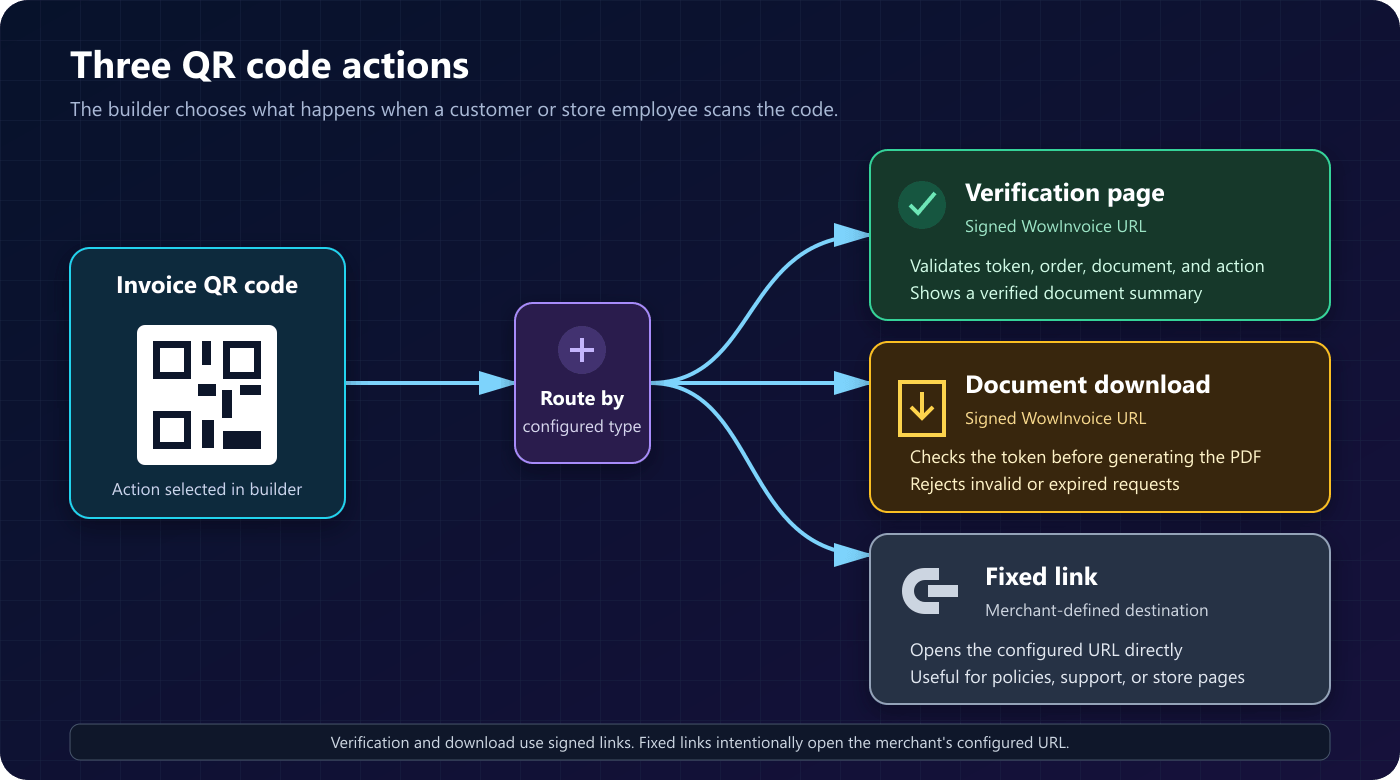
Without those checks, a convenient QR download could expose customer documents through a public URL.
Multilingual and right-to-left output
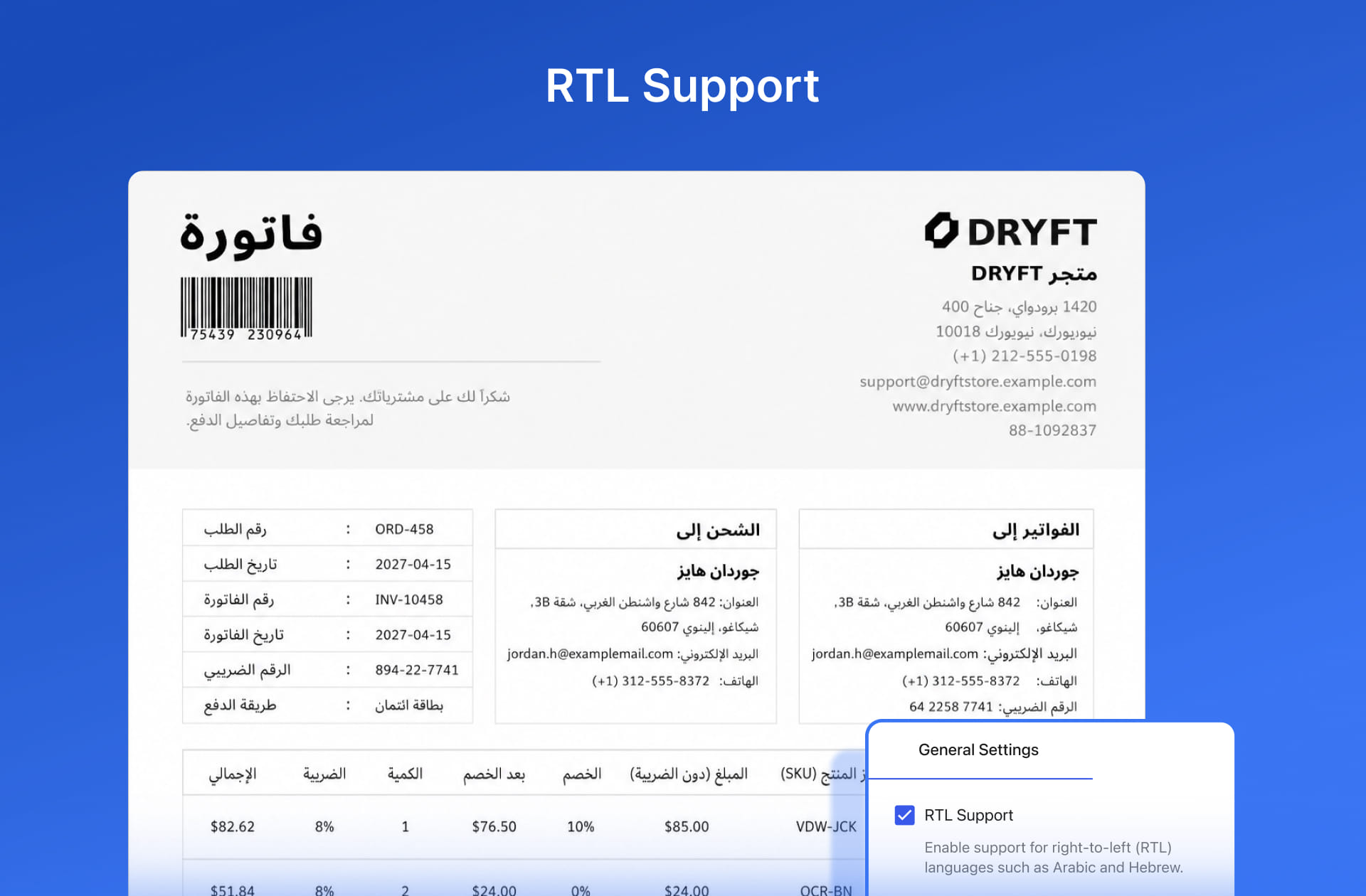
A document generator cannot stop at translating interface strings. Arabic, Hebrew, Persian, and Urdu also change text direction, alignment, spacing, font selection, and the visual order of invoice sections.
WowInvoice handles direction in both the template helpers and the mPDF configuration. Logical start and end helpers keep left and right rules out of individual templates. The renderer then enables right-to-left mode and selects fonts based on the language. It changes the document structure along with the translated labels.
From source to WordPress.org
WowInvoice combines a PHP 7.4-compatible backend with a React administration application built on WordPress tooling. REST endpoints connect the builder to document settings, searchable preview orders, metadata suggestions, fonts, bulk exports, and status diagnostics. Permission callbacks restrict builder and settings operations to administrators or users with appropriate shop-order capabilities.
The release workflow compiles the React and stylesheet assets, prefixes and optimizes the Composer dependency, generates translation files, packages the plugin, and deploys tagged builds to the WordPress.org SVN repository through Bitbucket Pipelines. That automation keeps the distributed archive separate from the development tree and closes the path from a versioned release to the public directory.
Conclusion
I built WowInvoice to handle the document work that follows a WooCommerce order. One configurable workflow connects seven outputs to order events, email delivery, customer access, warehouse tasks, bulk processing, tax data, electronic invoicing, and multilingual rendering.
I worked across the React builder, PHP document model, historical settings snapshots, prefixed mPDF pipeline, Action Scheduler jobs, WooCommerce HPOS and email integration, secure document links, and UBL XML generation. The finished plugin carries order data through invoicing, accounting, and warehouse fulfillment without asking the store owner to assemble that workflow from separate tools.