
Optimizing WordPress Plugin CI/CD with Git Worktrees and Bitbucket Pipelines
Samin Yaser
6 minute read · Saturday, July 11, 2026How I cut a WordPress plugin release pipeline from 7m 42s to 21s by building locally, isolating artifacts with Git worktree, and deploying in Bitbucket.
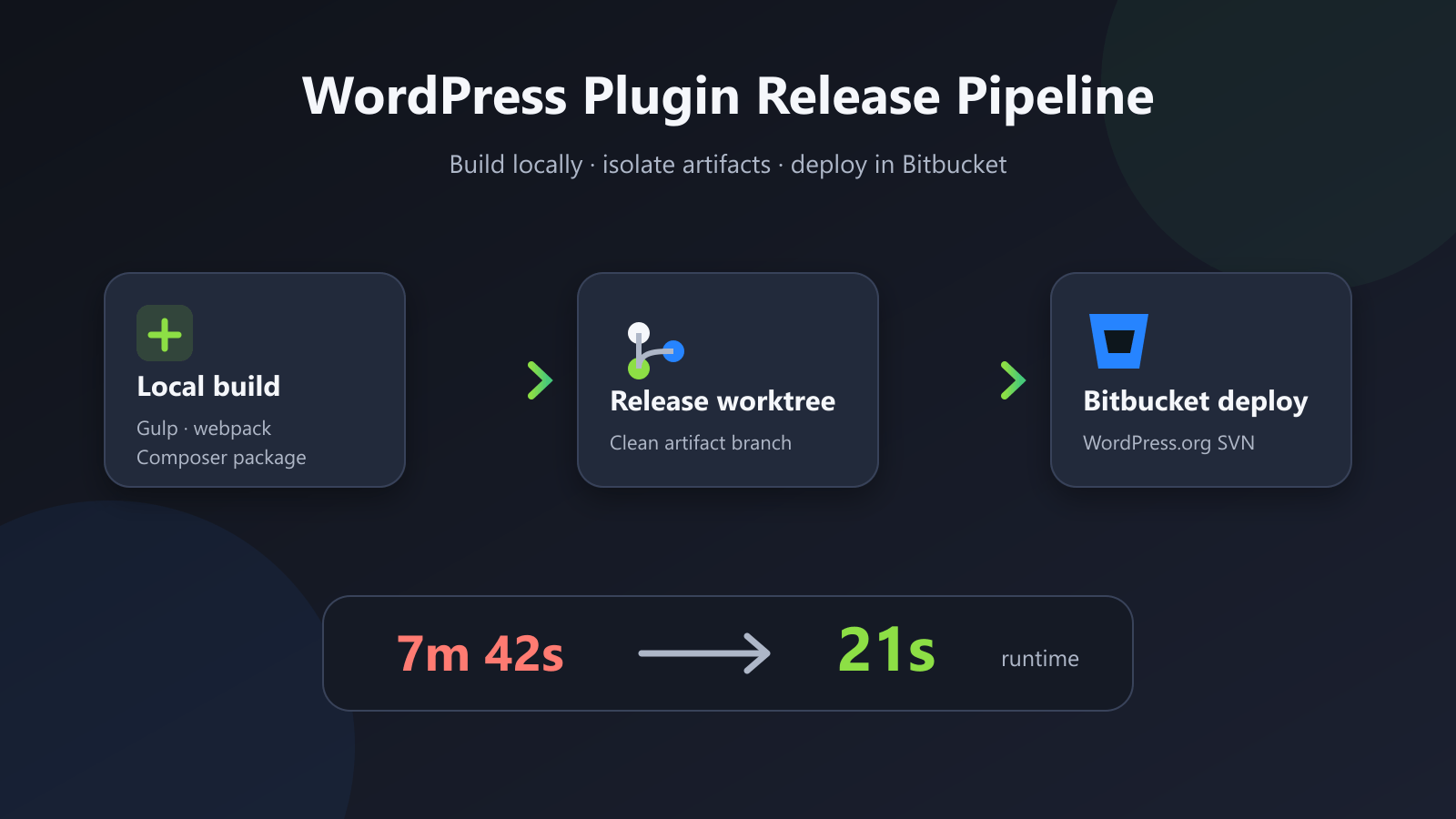
I rebuilt the release process for WowShipping around one constraint: Bitbucket should deploy the plugin, not spend pipeline minutes rebuilding artifacts I had already produced locally.
The new flow builds the WordPress plugin on my machine, copies only the distributable files into an isolated Git worktree, and pushes that worktree as a dedicated release branch. A version tag then starts Bitbucket Pipelines, which synchronizes the prepared package with the WordPress.org SVN repository.
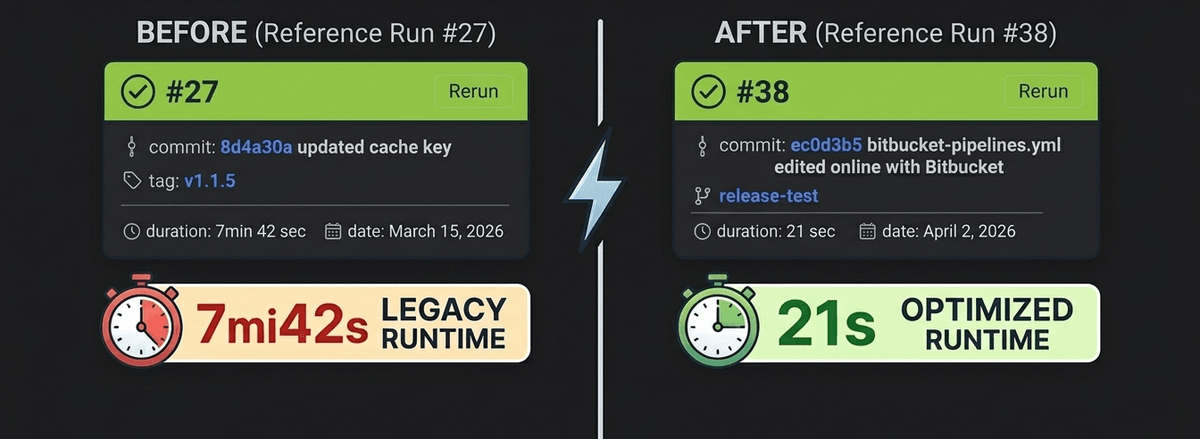
The measured runtime dropped from 7 minutes 42 seconds to 21 seconds. That is a 95.45% reduction and a 22x speedup for the reference runs. More importantly, releases now finish consistently in under 30 seconds without requiring a higher Bitbucket plan for additional pipeline minutes.
Why the original WordPress plugin release pipeline was slow
A typical CI release starts from source and repeats the entire production build inside a clean container. For this plugin, that can include:
- installing Node and Composer dependencies;
- compiling SCSS, Tailwind CSS, and JavaScript;
- generating production assets;
- assembling the plugin package;
- checking out WordPress.org SVN;
- copying the new files and committing the release.
That design is reproducible, but it makes every release pay the setup and build cost. It also duplicates work: I run and inspect the production build locally before creating a release, then CI performs the same build again.
I split the process at the artifact boundary instead. The local machine owns compilation and packaging. Bitbucket owns the short, credentialed deployment step.
The release architecture
The pipeline has four stages:
- Build and package the plugin locally.
- Create a separate worktree for the
releasebranch. - Replace that branch’s contents with the prepared build, then push the branch and version tag.
- Let the tag-triggered Bitbucket pipeline deploy those files to WordPress.org SVN.
The useful part is the boundary between steps two and three. The release branch is not another source branch. It is a transport branch containing the exact files intended for WordPress.org plus the pipeline definition needed to deploy them.
This keeps source-only files out of the release artifact. The Gulp configuration excludes development inputs and tooling such as src, node_modules, Composer metadata, source maps, scripts, and build configuration files. The resulting build directory is what gets copied to the worktree.
Why I used Git worktree for the release branch
I did not want release files mixed into my working directory or staged alongside source changes. A second clone would isolate them, but it would also duplicate repository storage and require extra remote setup.
git worktree gives one repository multiple checked-out working trees. The release task creates .worktrees/release and attaches it to the release branch while my main working tree remains on the development branch.
The preparation logic first removes a stale worktree, fetches the remote release branch when it exists, and then recreates the local branch from origin/release:
await runCommand('git', [
  'worktree',
  'add',
  '-f',
  '-B',
  'release',
  './.worktrees/release',
  'origin/release',
])
If the remote branch does not exist yet, the task creates the worktree from the current repository state. It then deletes the old worktree contents while preserving worktree metadata and copies the new build directory into place.
This gives the release code two useful properties:
- source changes in my main working tree stay untouched;
- stale files from an older plugin package cannot survive unnoticed in the release branch.
The second point matters for WordPress plugins. Copying only changed files is not enough when a release removes a PHP class, asset, or translation. Clearing the release tree before copying the new package makes deletion explicit.
Validate the release before pushing it
A fast pipeline is only useful if it rejects obvious release mistakes. Before committing anything, the Gulp task validates the requested tag against the plugin metadata.
The accepted format is vX.Y.Z or a channel suffix such as vX.Y.Z-beta. The task then checks that:
- the version matches
Stable taginreadme.txt; - the changelog contains an entry for that version;
- the generated Git tag exists before it is pushed.
The validation keeps the release tag, plugin metadata, and public changelog on the same version. It fails locally, before a malformed release reaches Bitbucket or WordPress.org.
The release is exposed through the project’s release:ci script:
{
  "scripts": {
    "release:ci": "npm run build:gulp && npm run build:webpack && composer install-prefixed && gulp package-ci"
  }
}
The package-ci task chains cleanup, artifact copying, worktree preparation, pipeline-file placement, release commit creation, branch and tag pushes, and worktree cleanup. The build still uses the project’s real Gulp, WordPress Scripts, and Composer toolchain; it simply runs where I can validate the result immediately.
Keep Bitbucket focused on deployment
The optimized bitbucket-pipelines-original.yml uses an Alpine image and runs only for tags matching v*.
Instead of installing the plugin’s JavaScript and PHP dependencies, the pipeline installs three deployment utilities:
- apk add --no-cache subversion rsync coreutils findutilsIt reads the plugin version from readme.txt, checks out the WordPress.org SVN repository, and uses rsync --delete to make trunk match the prepared build:
- rsync -av --delete --exclude='.svn/' "../$BUILD_FOLDER/" trunk/
- svn add trunk --force --quiet
- svn status trunk | grep '^!' | awk '{print $2}' | xargs -r svn remove --quiet
The --delete flag and the explicit svn remove pass handle both sides of synchronization. New files are added, changed files are overwritten, and files removed from the plugin are also removed from SVN.
The pipeline then creates the version directory under tags if it does not already exist and commits trunk plus the tag in one SVN operation. WordPress.org credentials remain Bitbucket deployment variables; the command disables credential caching inside the short-lived container.
The trade-off: this is an artifact branch, not a reproducible CI build
Moving compilation out of CI saves time and pipeline minutes, but it changes the trust model. The release depends on the local toolchain and on the developer running the complete production build before pushing.
I make that boundary explicit rather than pretending this is the same architecture as a hermetic CI build. It fits this plugin because releases are initiated manually from a controlled development environment, the generated package is inspected locally, and Bitbucket still provides a clean, logged deployment step.
There is another sharp edge: the implementation force-pushes the dedicated release branch and release tag. That is intentional for an artifact transport branch, but it would be unsafe on a collaborative source branch. To contain that risk, Bitbucket restricts write access to specific accounts authorized to publish releases, including mine. Other contributors cannot push to the branch, while the release history remains under the control of the people responsible for deployment.
For a larger team or a regulated release process, I would keep the same artifact boundary but produce the package in a dedicated build job, store it in immutable artifact storage, and let a separate deployment job consume its checksum-verified output. The worktree approach is optimized for a small plugin team where pipeline cost and release latency matter more than rebuilding in a pristine remote environment.
What changed in practice
The reference release went from 462 seconds to 21 seconds:
| Release path | Runtime |
|---|---|
| Previous pipeline | 7m 42s |
| Worktree-based pipeline | 21s |
| Reduction | 95.45% |
The speedup did not come from making the same remote build slightly faster. It came from removing work that did not belong in the deployment pipeline.
Git worktree made that separation practical. I can build from the normal development tree, move a clean artifact set through a purpose-built branch, and let Bitbucket perform the part that benefits from remote automation: authenticated, traceable deployment to WordPress.org.
The implementation is available in the plugin’s Gulp release tasks, package scripts, and Bitbucket pipeline definition.